Heads-Up Displays: Eye-Level Warnings vs. Overload
From military cockpits to everyday windshields, HUD tech brings instant warnings into view — but glare, clutter, and display limits can make them harder to trust. The next step is augmented reality.
The Two-Second Glance That Costs You the Road
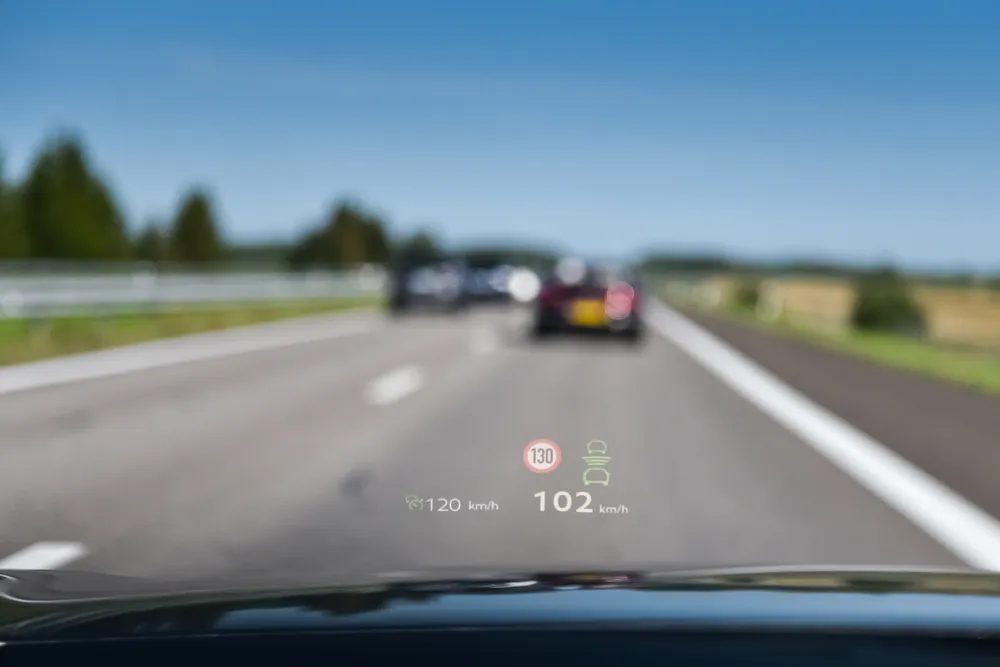
A driver looking down at a speedometer for just a few seconds may not feel risky, but even that brief shift in attention can raise the odds of an accident. Heads-up displays exist to eliminate that look away. By projecting speed, directions, and warnings directly onto the windshield or a small panel near the natural line of sight, the HUD keeps the road and the data in the same frame. Military aviation pioneered the idea, but automakers adapted it for passenger cars. The result is that a driver can check speed or a navigation cue without ever dropping the gaze from the traffic ahead. The system is designed to make the image appear several feet beyond the glass, so the eyes don't have to switch focus from near to far. Even a few seconds of distraction is enough to miss a pedestrian or a sudden stop, and HUDs are engineered to shrink that window.
Instant Warnings at Eye Level
Modern HUDs work in tandem with advanced driver assistance systems to present hazard alerts directly in the driver’s line of sight. The system uses a projector inside the dashboard that sends an image onto the windshield or a transparent combiner screen, where it appears to float several feet ahead of the vehicle. This optical design reduces the need for the eyes to refocus between the display and the road, which is critical when a warning flashes. If a vehicle enters a blind spot or traffic ahead slows suddenly, the display can flash a collision warning or blind spot notification without requiring the driver to look away from the road. Navigation arrows may also appear on the projected area, helping drivers anticipate lane changes or turns in time. The brightness adjusts automatically to match changing sunlight or nighttime conditions, so alerts stay visible without creating glare. By concentrating these safety cues into a single forward-facing interface, HUDs allow quicker reactions during critical moments, keeping attention on the driving scene rather than on a separate dashboard screen.
Warnings That Arrive in Your Line of Sight
Modern HUDs do more than show speed. Many integrate with advanced driver assistance systems (ADAS) to flash collision warnings, lane departure alerts, blind spot notifications, and adaptive cruise control updates directly on the windshield. If a vehicle slips into a blind spot or traffic ahead brakes suddenly, the HUD can light up a warning in the driver's view. Navigation arrows may also appear projected onto the roadway area. That direct placement cuts reaction time because the driver doesn't have to search for a separate dashboard light. The system works by combining multiple safety signals into one interface, which is why many automakers now offer HUDs as part of their premium safety packages. The result is a quicker understanding of a hazard while maintaining attention on the driving scene.
What the Display Typically Shows
A standard automotive HUD projects speed, navigation directions, fuel data, and safety warnings into the driver's field of view. Some systems also show turn-by-turn arrows or speed limit info, depending on the automaker. The idea is to consolidate the most frequently checked items from the dashboard into one transparent display. The content is not static; it can be customized through vehicle settings. The display may also adjust brightness automatically based on sunlight or nighttime conditions, so it stays readable without creating glare. The typical HUD panel is positioned near the base of the windshield or on a small combiner screen. That placement keeps the driver's eyes moving horizontally rather than up and down, which is easier on the neck and the eyes. The automotive industry has borrowed heavily from aviation, but the content set is now tailored to road driving.
From Luxury Feature to Everyday Option
Early HUD systems were typically reserved for high-end vehicles, but the technology has been spreading into more affordable models as production costs fall. The core projection method—a small projector aimed at a reflective surface on the windshield—is simple enough to be manufactured cheaply, which is why budget-friendly versions now appear in mid-range cars. By placing speed, navigation, and fuel data a few feet ahead of the driver, these systems cut down on the frequent refocusing that comes from glancing between the dashboard and the road. While advanced HUDs with augmented reality or integrated ADAS alerts still tend to appear in higher trim levels or luxury vehicles, basic HUDs that display core information are becoming a standard option in many models. Automakers continue to refine the interface to balance usefulness with simplicity, and as the cost of the necessary optics falls, even more drivers will get access to this safety-boosting feature without having to pay a premium.
Challenges That Affect HUD Visibility
Despite their benefits, HUDs are not without limitations. The system depends on a clear, correctly shaped windshield and precise alignment of its projector and mirrors. Bright sunlight can wash out the projected image, and poor calibration or even slight windshield damage may make the display blurry or misaligned. Replacing a windshield without proper alignment can also distort what the driver sees, because the curvature of the glass is part of the optical path that creates the floating image. The projection appears several feet ahead of the vehicle, which means any imperfection in the glass scatters the light and compromises clarity. Some drivers may find the projection itself distracting until they grow accustomed to it, and too much on-screen information can reduce its effectiveness. Automakers are addressing these issues by refining the interfaces, aiming for a balance that keeps the display simple and useful without overwhelming the driver. They also implement automatic brightness adjustment to combat glare from bright conditions, but the fundamental reliance on a clean windshield remains.
What Can Make a HUD Hard to Read
Even with sophisticated optics, a HUD is not immune to environmental interference. The system relies on a projector and a series of mirrors to cast an image onto the windshield, where it appears to float a few feet ahead of the car. That floating image is only possible if the glass has the exact curvature the optical system was designed for. Poor calibration or damage to the windshield can cause blurring or distortion. Improper windshield replacement is a common culprit—if the glass is not the right spec or is installed incorrectly, the HUD alignment can be thrown off, leading to double images or a display that appears out of focus. The situation is aggravated if the windshield has a special coating or is not the original equipment, because the coating can reflect or absorb the projected light unevenly. Some drivers also find the projected images distracting at first, until they get used to looking through them. Automakers address this by offering settings to adjust brightness and position, but the fundamental limitation remains: the display depends on a clean, correctly shaped windshield.
The Risk of Overloading the Display
Showing too much information on a HUD can defeat its purpose. If the display becomes crowded with icons, alerts, and navigation details, it can overwhelm the driver and reduce the benefit. Automakers are aware of this, so they refine the interface to balance usefulness with simplicity. One common approach is to allow drivers to customize which data appears. The cost of the technology is another factor. Advanced HUDs often show up in higher trim levels or luxury vehicles, which puts them out of reach for some buyers. However, as production costs drop and the optics become cheaper, HUDs are gradually appearing in more affordable models. The trend is toward making the system standard rather than an expensive add-on. The challenge is to keep the display helpful without turning it into a second dashboard.
The Next Step: Augmented Reality on the Windshield
The next generation of HUDs is expected to move beyond simple text and icons. The concept originated in military aviation, where pilots used similar displays to monitor flight data without looking away from the sky. Augmented reality will likely paint navigation arrows directly onto the road surface, highlight hazards like pedestrians or stopped vehicles, and even communicate with other driver assistance systems. Instead of a flat digital readout, the windshield becomes a dynamic layer of information over the real world. Future versions may also share data with adaptive cruise control or lane-keeping tech to project the vehicle's path or safe following distance. The military aviation heritage is still pushing the envelope, with fighter jets already using similar augmented reality. As costs decrease, these systems will likely appear in mainstream cars, giving drivers access to hazard highlighting and expanded communication with the car's sensors. The speed of that shift depends on how fast production costs drop.